


CVTz50
4.381.00 Reviews
App Specs
- Version
- 1.54
- Updated On
- License
- $4.99
- Downloads
- 100,000+
- Developer
- CVTz50
- Categories
- Auto & Vehicles
- Platform
- Android
Screenshots
 Analysis by AppCompare
I treat any phone-based car diagnostic tool with a little caution: readings can help me ask better questions, but they are not the same as a mechanic inspecting a vehicle. That distinction matters especially with a continuously variable transmission, where a concerning value needs context rather than a snap diagnosis. CVTz50 is aimed at Nissan-based vehicles with CVTs, so its appeal is focused rather than universal. If that matches your car, it may help you understand what is happening before you decide what to do next.
The app is made by CVTz50 and sits in the Auto & Vehicles category. It has a 4.3 average from around 4.7 thousand ratings, with over 100 thousand installs. Those figures suggest a meaningful audience, but I would not treat popularity as proof that every adapter, vehicle, or reading will work in the same way. I would first check that my vehicle is within the app’s intended range and that my OBD-II adapter is compatible.
What I would check before connecting
CVTz50 is a paid app, priced at $4.99, and rated for Everyone. It was released on June 14, 2016, and its current version is 1.54, with Android 4.0 listed as the minimum operating system. Those details make the purchase decision fairly straightforward: the important question is not whether the app is broadly useful for cars, but whether its Nissan-focused CVT diagnostics fit your particular vehicle and setup.
The app works with an ELM327 adapter, which is a separate piece of hardware that connects the phone to the car’s diagnostic port. That means there are two compatibility checks, not one: the phone connection and the vehicle data the adapter and app can access. I would confirm both before buying an adapter or relying on a reading. A generic code-reader app may suit someone who only wants basic engine codes across different makes; this one makes more sense when transmission information for a Nissan-based vehicle is the priority.
Getting to Know CVTz50
First off, let's talk about what CVTz50 actually does. Essentially, it’s a diagnostic tool for your car's Continuously Variable Transmission (CVT). Now, I know "diagnostic tool" might sound a bit dry, but trust me, if you're a car enthusiast or just someone who likes to keep their ride running smoothly, this app is pretty darn exciting. It connects to your car's onboard computer using an OBD-II adapter and gives you real-time data and diagnostics, all from your smartphone.
User Interface and Experience
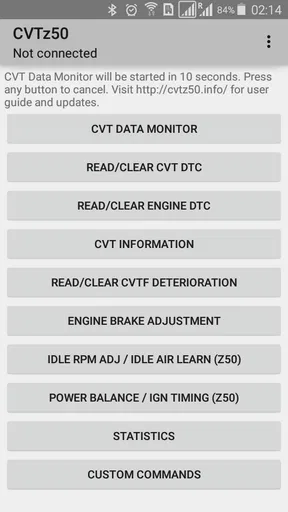
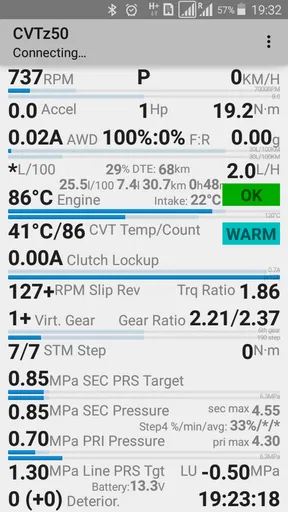
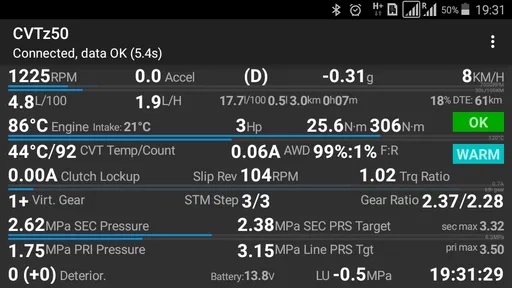
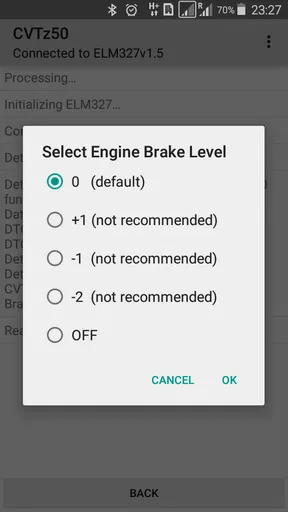
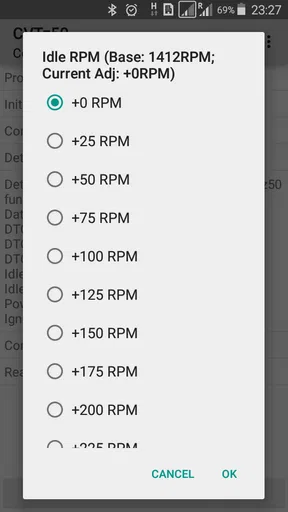
Diving into the app, the user interface is surprisingly intuitive. You don’t have to be a tech wizard to navigate through the menus. The design is clean, with all the technical data neatly organized. I found it easy to switch between different views and access the information I needed without any hassle. One cool feature is its ability to display live data, so you can see exactly what's happening with your transmission as you drive.
Connecting the app to your car is a breeze, too. As long as you have a compatible OBD-II adapter (there are plenty of affordable options out there), you're good to go. The app supports both Bluetooth and Wi-Fi connections, so you can choose what works best for your setup.
Worth Reading Before You Choose

EA SPORTS FC Mobile 26 Is a Bigger Football Game, but It Takes Time

Flipboard Shows What News Apps Must Do Beyond the Feed

Switching to Android Auto Means Rethinking Your Driving Routine

Google Calendar Makes a Crowded Week Easier to Manage

Ludo King Makes the Most of the Minutes Between Plans

Baby Panda World Brings Quick Play to Modern Phones, but Its Game Library Feels Busy
Features That Stand Out
Now, let’s get into the meat of why this app is so cool. One of the standout features is its ability to read and clear diagnostic trouble codes. This means you can potentially save yourself a trip to the mechanic by diagnosing any issues yourself. It’s like having a little mechanic in your pocket!
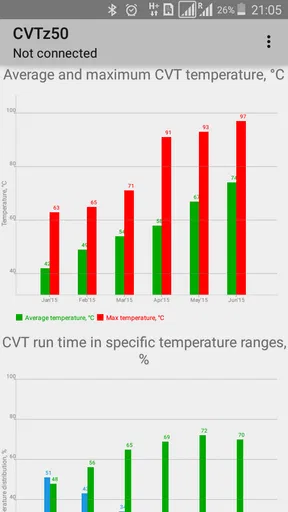
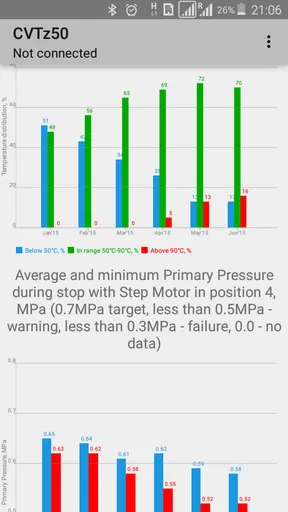
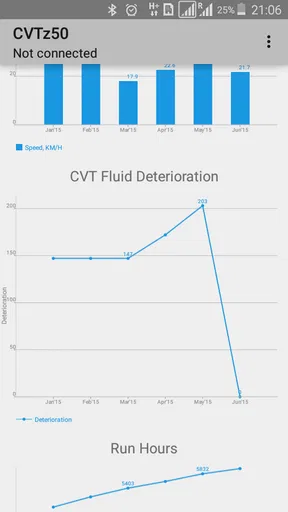
Another feature I really appreciate is the app’s ability to track transmission temperatures and pressures. This is crucial because it helps you monitor your transmission's health in real-time, potentially extending its lifespan. Plus, for those who like to get into the nitty-gritty, the app provides detailed graphs and logs that you can analyze at your leisure.
Using the readings with care
I would use the live display as a way to observe patterns, not as a reason to watch a phone while driving. If I wanted to see how a transmission behaves in ordinary traffic, I would set things up while parked, keep the phone secured, and review the values only when stopped or with a passenger managing the screen. A brief note about the conditions—such as whether the car was cold, warmed up, or climbing a hill—can make a saved graph much more useful later than a number on its own.
Clearing a trouble code deserves similar restraint. A code can be useful evidence for a repair shop, so I would record it before clearing anything and avoid treating a cleared warning as a repaired problem. If a warning returns, or the vehicle feels abnormal, the app can help me describe what I observed, but it cannot replace a proper inspection. That is one of the most important trade-offs of DIY diagnostics: more information is helpful, while false confidence can be costly.
Where it fits in a real maintenance routine
Imagine a driver who notices a dashboard warning on the way home and already owns a compatible adapter. Once safely parked, they connect the phone, read the code, and save the result before deciding whether to book a service appointment. If they later take the car to a shop, they can explain when the warning appeared and share the code instead of relying on memory. That is a practical use for the app even if the driver never attempts a repair personally.
For someone who is already tracking transmission behavior, a more deliberate routine can help: take readings under comparable conditions, keep the vehicle stationary when reviewing the screen, and compare logs over time rather than reacting to a single fluctuation. I would not deliberately push the car hard just to create an interesting graph. The value lies in observing normal use and bringing clearer information to a mechanic, not in turning a commute into a test session.
Why You Might Love It
If you're someone who loves tinkering with cars or just wants to ensure your vehicle is in tip-top shape, CVTz50 is a must-have. It’s especially useful if you have a Nissan or Infiniti, as these are the cars it's primarily designed for. The app provides peace of mind by giving you the tools to understand and maintain your vehicle’s transmission health.
Additionally, the app’s community support is fantastic. There are plenty of forums and online groups where you can get advice and tips from fellow users. This makes it easier to troubleshoot any issues and learn more about how to get the most out of the app.
Who should choose another approach
The app is a poor fit if you drive a vehicle outside its Nissan-based CVT focus, do not want to buy or configure an adapter, or only need a basic code check across several unrelated makes. A repair shop’s scan equipment is the better choice when a fault needs a confirmed diagnosis, and a simple universal reader may be more convenient for broad, occasional engine-code checks. CVTz50’s strength is specialization; that same narrow focus is the reason I would not recommend it as a general-purpose car app.
It also assumes that the user is willing to learn what the displayed information means. Someone who wants a plain-language answer such as “safe to drive” or “replace this part” may find the readings less decisive than expected. Vehicle behavior, stored codes, and live values need interpretation together. I would use the app to become better informed, not to make a repair decision from one screen or to postpone help when the car is behaving badly.
Trust, access, and practical boundaries
Before connecting any diagnostic app, I would look at the phone’s permission prompts and consider whether each requested access makes sense for the task. I would grant only what is needed to establish the adapter connection and use the functions I actually want. I would also avoid entering sensitive personal details into third-party discussion spaces when asking for help; a vehicle symptom and a code are usually more useful than personal identifiers.
There is a practical data-sensitive moment when the phone communicates with a vehicle: readings can reveal details about the car’s condition and use. I would keep the adapter connection under my control, disconnect when finished if that suits my setup, and be mindful about who can see the phone while the car is being diagnosed. These are sensible habits, not a claim about a particular privacy policy or permission design. The key point is that users should make their own choices deliberately instead of assuming every connection is consequence-free.
Some readers will wonder whether an ELM327 adapter is included or whether the app can work without one. The diagnostic workflow described here depends on an adapter, so I would plan for that separate hardware and verify the model’s compatibility before spending money. Others may ask whether the app can diagnose every Nissan or Infiniti issue: its transmission-oriented information can be useful, but it should not be mistaken for a full workshop assessment or a guarantee that every fault will be identified.
Things to Keep in Mind
Of course, no app is perfect. While CVTz50 does a lot, it’s important to remember that it’s primarily for CVT transmissions in Nissan and Infiniti models. If your car doesn’t fall into this category, you might not find the app as useful. Also, while the app is pretty straightforward, there’s a bit of a learning curve if you’re not familiar with car diagnostics.
That said, the app is regularly updated, and the developers seem committed to improving the user experience and expanding compatibility. So, even if it’s not perfect now, there’s a good chance it’ll keep getting better.
Final Thoughts
All in all, CVTz50 is a fantastic tool for anyone looking to get more hands-on with their vehicle’s maintenance. It’s user-friendly, packed with features, and can potentially save you a lot of money in the long run. Whether you’re a car enthusiast or just someone who wants to keep their ride running smoothly, this app is definitely worth a look.
So, if you’re ready to take control of your car’s health and avoid unnecessary trips to the mechanic, give CVTz50 a try. You might just find it’s the app you never knew you needed!
Pros
- User-friendly interface for easy navigation.
- Real-time data monitoring enhances performance.
- Supports a wide range of vehicle models.
- Offers detailed diagnostic information.
- Customizable settings for personalized use.
Cons
- Requires external adapter for connectivity.
- Limited free features without subscription.
- Initial setup can be time-consuming.
- May not support older vehicle models.
- Frequent updates needed for bug fixes.
FAQs for CVTz50
What is CVTz50 and what does it do?
CVTz50 is a diagnostic app designed for vehicles equipped with a Continuously Variable Transmission (CVT). It provides real-time data, diagnostic codes, and performance metrics directly from your vehicle. This app is particularly valuable for mechanics, car enthusiasts, and anyone interested in monitoring their vehicle's CVT health and functionality.
Is CVTz50 compatible with all vehicles?
CVTz50 is specifically designed for vehicles equipped with a Jatco CVT transmission. It's important to verify your vehicle's compatibility before downloading. The app may not support other transmission types, so checking your car's specifications is crucial to ensure compatibility and avoid disappointment.
How user-friendly is the CVTz50 app?
CVTz50 offers a user-friendly interface with intuitive navigation, making it accessible for both beginners and experienced users. The app provides detailed graphs and data displays that are easy to interpret, allowing users to quickly understand their vehicle's transmission performance without needing extensive technical knowledge.
Does CVTz50 require any additional hardware?
Yes, CVTz50 requires an OBD-II Bluetooth adapter to connect to your vehicle. This adapter facilitates communication between the app and your car’s CVT system. Make sure to purchase a compatible adapter, as the app’s performance depends on reliable data transmission from your vehicle.
Is there customer support available for CVTz50 users?
CVTz50 offers customer support through various channels, including email and online forums. Users can access troubleshooting tips, FAQs, and community discussions for additional help. The support team is responsive and dedicated to assisting users with any app-related issues or questions they may encounter.


